
Dreamweaver CMS Template Tutorial – Install and Replace Dede Template
- GEO小小课堂网 xxkt.org.cn - 阅 50I believe many people’s first websites were built using Dedecms, because the templates in the installation package on the official website of Zhimeng are outdated. Although there is a mobile version, it is not adaptive, so we often encounter the problem of replacing the magic board when using Zhimeng CMS in our daily lives.SEOThe self-study website brings the “Weaving Dreams CMS Template Tutorial – Installing and Replacing Dede Templates”. I hope it is helpful to everyone.
1、 Several forms of dream weaving templates
There are usually three types of dede templates we receive: pure dede templates, dede templates with partially modified files, and dedecms full site source code.
2、 Pure Dede Template Installation and Replacement
① Introduction to Pure Dede TemplateA template file like the one below, which has. html, js, img, and css folders, is a simple template file.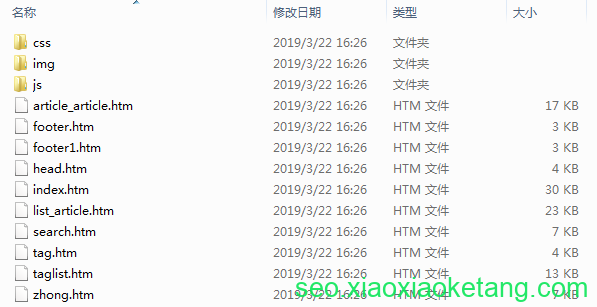
② Pure Dede template installationIn fact, templates like this should be the best templates because they are the cleanest and easy to install.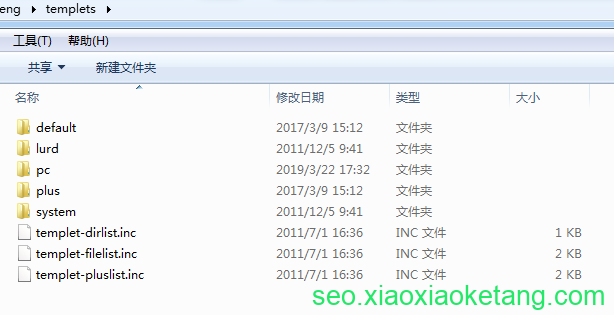 Installation Step 2:
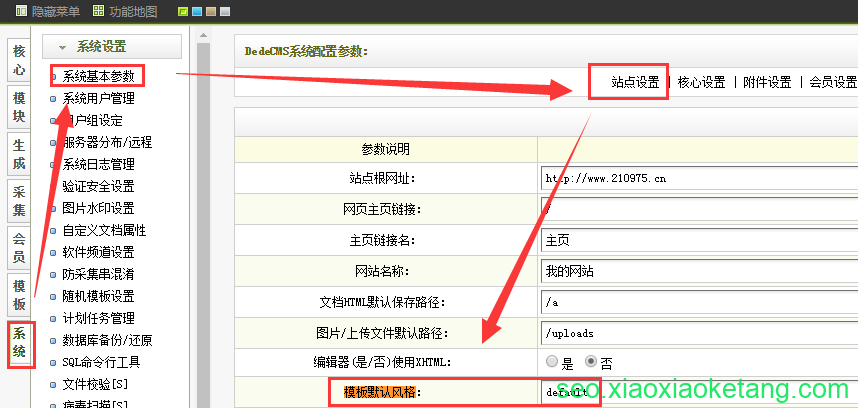 Installation Step 4:
3、 Dede template+partially modified files
For this template, you need to copy all these files to the source code of Zhimeng. If prompted to overwrite, click “Overwrite All”.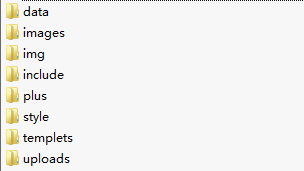 This template file is usually suitable for creating new websites. First, overwrite the official template of Zhimeng, and then upload and install it.
4、 Dedecms full site source code
In fact, another commonly used method is the installation of dedecms full site source code, which is no different from the official installation. However, it should be noted that the lock. txt file under the install file in the website root directory should be deleted first.Changing servers by Baidu K-site? Six steps to replace website server》.
非特殊说明,本文为小小课堂SEO自学网原创,欢迎转载并保留版权 https://www.xxkt.org.cn/
本站提供SEO与GEO培训、咨询、诊断,微信(电话):13722793092 微信公众号:xxktorg
标签:dedecms seo 文章最后更新时间:六月 19, 2026



发表评论